What is Keyword Cannibalization? (And How to Fix It)
Written by Habib Ur Rehman • Last Updated: November 11, 2026

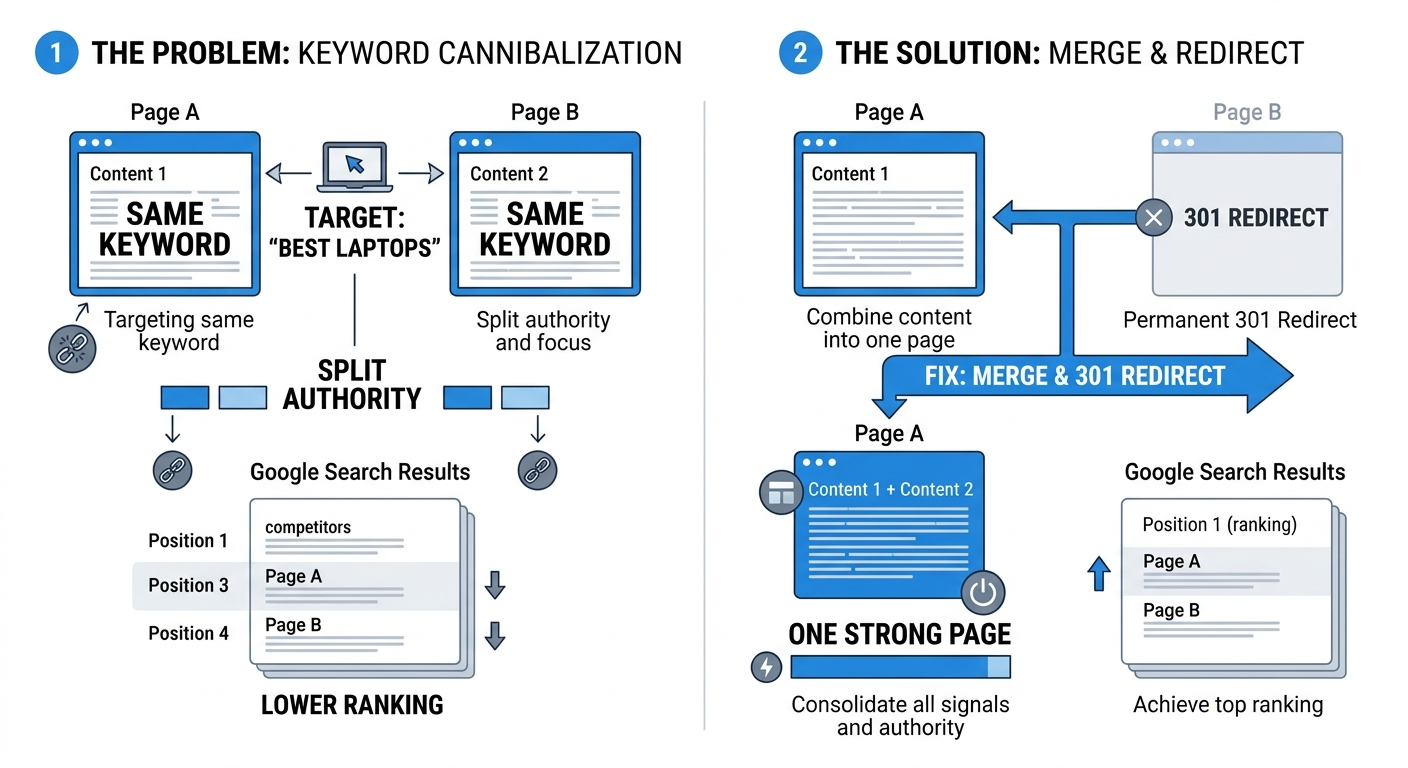
Quick Summary: Keyword cannibalization happens when two or more pages on your website target the same keyword. Instead of Google seeing one strong page to rank, it gets confused and splits your ranking power between the pages. This can drop both pages in the search results. To fix it, you need to identify which pages are competing, choose the strongest one, and either merge the content or redirect the weaker pages to the strongest one.
Hello! Have you ever noticed that one of your articles was ranking on page 1 of Google, but after a few weeks, it suddenly dropped to page 3? Or maybe you published a new post, and your older, well-performing post lost its rankings? If this has happened to you, there is a very high chance you are experiencing Keyword Cannibalization.
This is one of the most common and frustrating problems for bloggers and website owners. You work hard to create great content, but then your own pages start fighting each other. In this detailed guide, I will explain exactly what keyword cannibalization is, why it hurts your SEO, how to find it, and most importantly, how to fix it.
Let's get started.
What is Keyword Cannibalization?
Keyword cannibalization is an SEO problem where multiple pages on your website target the same keyword or very similar keywords. When this happens, Google does not know which page is the most relevant. Instead of ranking one page in the number 1 position, it might rank one on page 2 and the other on page 3. Sometimes, it might even alternate between the two pages.
Imagine a company with two salesmen. Both are trying to sell the same product to the same customer. The customer gets confused, does not know who to listen to, and walks away. This is exactly what happens to Google when it sees two pages on your site about the same thing. Google gets confused and may decide to rank neither page well.
The word cannibalization comes from cannibal, which means to eat your own kind. In SEO, it means your own pages are eating each other's ranking potential. Your pages are competing against each other instead of competing against other websites.
How Does Keyword Cannibalization Happen?
Keyword cannibalization does not happen because you are a bad writer. It happens for several very common reasons.
1. You Write About the Same Topic Multiple Times
This is the most common cause. You might write a post called "How to Bake a Cake." A few months later, you learn something new and write another post called "The Ultimate Guide to Baking a Cake." Both pages are about the same thing. Google does not know which one to rank.
2. You Have Similar Product or Service Pages
If you run an e-commerce store, you might have a page for "Red Shoes" and another page for "Red Sneakers." These are essentially the same thing. Google sees them as duplicate content.
3. You Target Different Variations of the Same Keyword
You might have one page targeting "best coffee maker" and another targeting "best coffee machines." Google often treats these as the same search intent and will rank the same pages for both.
4. You Do Not Audit Your Old Content
If you have been blogging for a long time, you might forget what you have already written about. Without regular content audits, you can easily write two or three articles on the same topic over a few years.
Why is Keyword Cannibalization Bad for SEO?
Keyword cannibalization is not just a small mistake. It can have several serious negative effects on your website's SEO performance.
1. It Confuses Google
Google's algorithm tries to find the single best page for a search query. When you have two equally good pages, Google cannot decide which one to rank. It might show one page one day and the other page the next day. This inconsistency hurts your ranking stability.
2. It Splits Your Internal Links
If you write two articles about the same topic, you might link to them from other pages on your site. Instead of all your internal links pointing to one strong page, they are split between two weaker pages. This dilutes the link juice (ranking power) for both pages.
3. It Splits Your Backlinks
The same thing happens with external backlinks. If other websites find both of your articles, they might link to different ones. Instead of 20 good backlinks pointing to one page, you have 10 backlinks pointing to one and 10 pointing to another. Neither page is strong enough to rank high.
4. It Wastes Your Crawl Budget
Google has a limited amount of time to crawl your website. If it is wasting time on two pages that say the same thing, it has less time to crawl your other important pages. You can learn more about crawl budget in our guide on HTTP Status Codes.
5. It Lowers Your Click-Through Rate
If two of your pages appear on the same search results page (e.g., one at position 8 and one at position 9), users might see them, get confused, and click on neither. This lowers your click-through rate, which is a negative signal to Google.
How to Find Keyword Cannibalization
Now that you know how bad it is, the next step is to find it on your own website. Here are the best ways to do it for free.
1. Use Google Search Console
Google Search Console (GSC) is the best free tool for this. Here is how to use it:
- Go to the Performance report in GSC.
- Click on the Search Results tab.
- Click the Pages filter and select a specific page you think might be cannibalized.
- Then, click the Queries tab. Look for queries where the same page is ranking for many different keywords.
- Alternatively, click on a specific query and look at the Pages tab. If you see more than one URL from your site ranking for the same query, you have cannibalization.
2. Use SEO Tools Like Ahrefs or Semrush
If you have a paid SEO tool, this is much easier. In Ahrefs, you can use the Site Explorer to see all the keywords a specific page ranks for. If you see two pages ranking for the same keyword, that is cannibalization.
3. Use Google Itself
You can also search on Google using the site: operator. Type site:yourwebsite.com "your target keyword". This will show you all the pages on your site that Google has indexed for that keyword.
4. Use Our Free Keyword Tools
You can use our Keyword Magic Tool to see what keywords you are targeting. Then, use our Keyword Density Checker to see if multiple pages are optimized for the same term.
How to Fix Keyword Cannibalization
Once you have found a case of cannibalization, you need to fix it. There are several ways to do this, and the best one depends on your specific situation.
Method 1: Merge the Content and Redirect
This is the best and most common method. Let's say Page A and Page B are both about "How to Bake a Cake."
- Choose the Master Page: Look at the two pages. Which one has better content, more backlinks, or a better URL? That is your master page. Let's say it is Page A.
- Merge the Content: Take any unique information from Page B (like a useful tip, a different recipe variation, or a new image) and add it to Page A.
- 301 Redirect Page B: Delete Page B and set up a 301 redirect from Page B to Page A. This tells Google that Page B has permanently moved to Page A. You can learn how to do this in our guide on Canonical Tags vs 301 Redirects.
Method 2: Differentiate the Content
If both pages are important and you want to keep them both, you need to make them different. For example, if Page A is a general guide on "How to Bake a Cake," you could change Page B to target a more specific keyword like "How to Bake a Chocolate Cake for Beginners."
Method 3: Use a Canonical Tag
If you have two pages that are almost identical and both need to stay live (for example, a print version and a regular version of an article), you can use a canonical tag. This tells Google which page is the original. You can learn more about this in our guide on Canonical Tags vs 301 Redirects.
Method 4: Update the Weaker Page
Sometimes, the problem is that you are not linking to one of the pages. You can fix this by adding internal links from other pages on your site to the weaker page. This signals to Google that the page is important. You can use our Broken Link Checker to ensure your internal links are working correctly.
How to Prevent Keyword Cannibalization
The best way to deal with keyword cannibalization is to prevent it from happening in the first place.
- Do a Content Audit: Before writing a new article, search your own website to see if you have already written about the topic. You can use Google search with the site: operator for this.
- Use a Keyword Map: Create a simple spreadsheet where you write down the main keyword for every page on your website. Before writing a new post, check the sheet to ensure the keyword is not already taken.
- Focus on Topics, Not Just Keywords: Instead of trying to rank for every single variation of a keyword, create one comprehensive piece of content that covers the entire topic. This is called a pillar page. You can learn more about this in our guide on Entity Salience.
A Note from the Developer
"I once had a client whose organic traffic dropped by 40% in one month. They were panicking. I looked at their Search Console and found they had written three different blog posts about the same topic. None of them were ranking. I merged all three into one massive, detailed guide and redirected the other two to it. Within three weeks, that single guide ranked on page 1, and their traffic recovered and even grew." — Habib Ur Rehman
Frequently Asked Questions (FAQ)
What is keyword cannibalization?
Keyword cannibalization happens when multiple pages on your website target the same keyword. Instead of one strong page ranking, Google gets confused and ranks neither page well.
How do I find keyword cannibalization?
Use Google Search Console to see which queries bring up multiple URLs from your site. You can also use tools like Ahrefs or Semrush to find pages competing for the same terms.
What is the best way to fix keyword cannibalization?
The best way is to choose one 'master' page, merge the best content from the other pages into it, and then 301 redirect the other pages to the master page.
Can I use a canonical tag to fix cannibalization?
Yes, but only if both pages must stay live (like a print version). A 301 redirect is usually better for SEO because it permanently moves all ranking power to one page.
Conclusion
Keyword cannibalization is a silent SEO killer. It can slowly drain your rankings without you even realizing why. But the good news is that it is easy to fix once you know what to look for. By regularly auditing your content, using Google Search Console, and merging or redirecting competing pages, you can keep your SEO strong and your rankings high.
If you want to check your website for technical errors that might be holding you back, use our free Speed Checker and Broken Link Checker. Happy optimizing!
Explore More Free SEO Tools
Written and reviewed by: Habib Ur Rehman, Full-Stack Web Developer & SEO Specialist.
Last Updated: November 11, 2026.