HTTP Status Codes for SEO: The Complete Guide
Written by Habib Ur Rehman • Last Updated: November 11, 2026

Quick Summary: HTTP status codes are three-digit numbers that tell browsers and search engines what happened when they requested a page. For SEO, the most important codes are 200 (OK), 301 (Moved Permanently), 404 (Not Found), and 5xx (Server Errors). Using the correct codes helps Google crawl your site efficiently, preserves your link equity, and prevents wasted crawl budget. Always ensure that pages you want indexed return a 200 status.
What is an HTTP Status Code?
Every time you visit a website, your browser sends a request to a web server. The server responds with a three-digit number. This number is called an HTTP status code. It tells the browser whether the request was successful, if the page has moved, or if there was an error.
For search engines like Google, these codes are extremely important. Googlebot uses them to understand what to do with a page: should it be indexed? Should it be ignored? Should Google come back later? If your server sends the wrong codes, Google might get confused and drop your pages from its index.
HTTP status codes are divided into five classes: 1xx (Informational), 2xx (Success), 3xx (Redirection), 4xx (Client Error), and 5xx (Server Error). For SEO, you mainly need to understand 2xx, 3xx, 4xx, and 5xx.
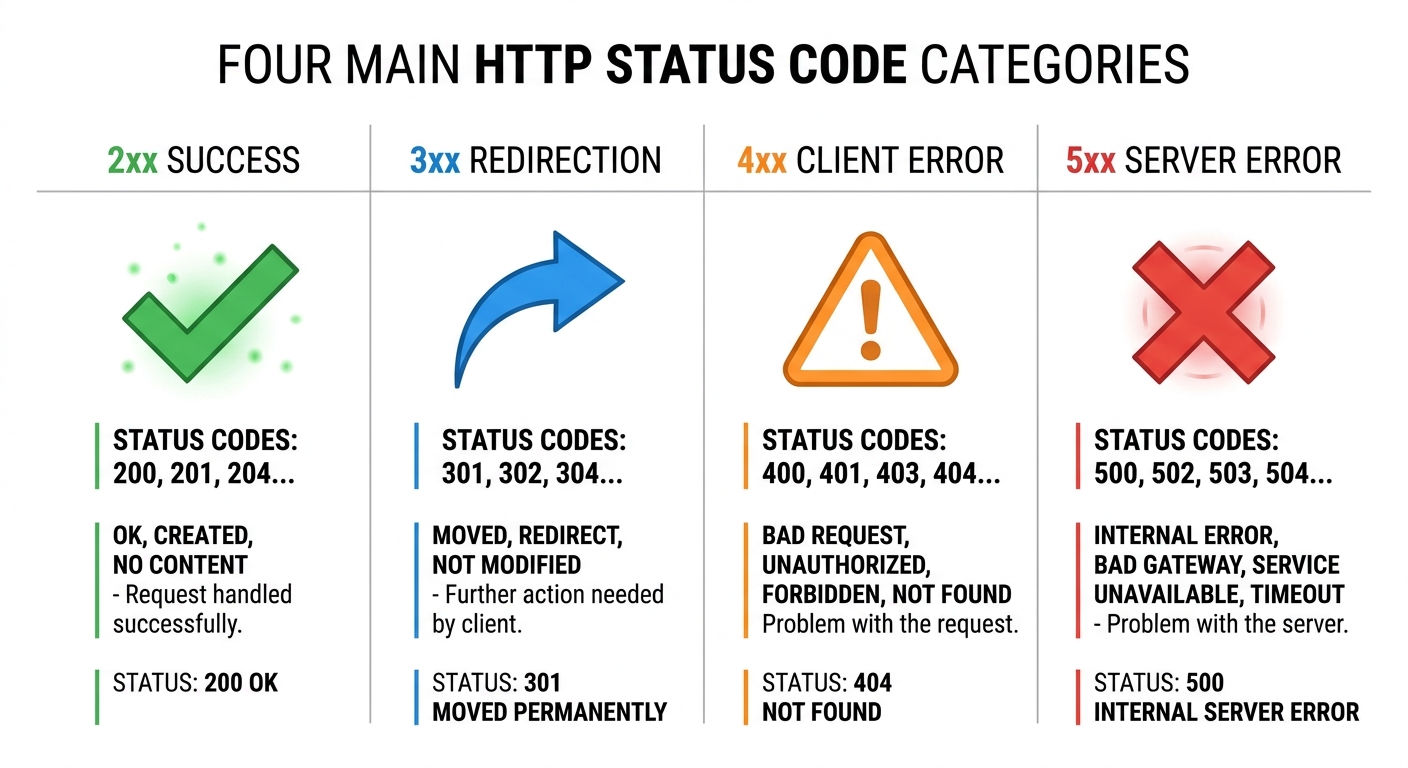
The 4 Most Important HTTP Status Codes for SEO
While there are dozens of status codes, these four have the biggest impact on your search rankings.
1. 200 OK (Success)
This is the most important code. It means the page exists and was successfully loaded. Every page you want Google to index and rank must return a 200 status code. If a page returns any other code, Google will not index it as a normal page.
You can check the status code of any page by using our free Broken Link Checker or by using the Inspect Element tool in your browser.
2. 301 Moved Permanently (Redirect)
A 301 code tells Google that a page has permanently moved to a new URL. It passes almost all of the SEO value (link juice) from the old page to the new page. You should use a 301 redirect when you delete a page, change a URL, or move to a new domain.
However, avoid 301 redirect chains (e.g., Page A redirects to Page B, which redirects to Page C). Redirect chains waste crawl budget and can confuse Google. Always redirect directly to the final destination.
3. 404 Not Found (Client Error)
A 404 code means the page does not exist. This can happen if a page was deleted or if a user typed the wrong URL. A 404 page is not harmful for SEO, but if you have many 404 errors, it can hurt the user experience and waste crawl budget. Use our Broken Link Checker to find and fix them.
If a page has been permanently removed and will not come back, you can use a 410 code instead of a 404. A 410 tells Google the page is permanently gone, which can speed up its removal from the index.
4. 5xx Server Errors
5xx codes mean the server failed to fulfill the request. Common examples include 500 (Internal Server Error) and 503 (Service Unavailable). These errors are very bad for SEO. If Googlebot repeatedly encounters 5xx errors, it may slow down crawling or stop crawling your site entirely.
If you are doing maintenance, a 503 code (with a Retry-After header) is the correct way to tell Google to come back later.
HTTP Status Codes and Crawl Budget
Crawl budget is the number of pages Googlebot will crawl on your site within a given time. Every time Googlebot hits a URL, it checks the status code. If it repeatedly encounters 404s, 301 chains, or 5xx errors, it wastes crawl budget that could have been used for your important pages.
By returning the correct status codes, you help Google spend its time on pages that matter. This is especially important for large websites with thousands of pages.
How to Check Your Status Codes
There are several free ways to check the status codes of your pages:
- Browser Developer Tools: Right-click on a page, select "Inspect," go to the "Network" tab, and refresh. You will see the status code next to each file.
- Free Online Tools: Use our Broken Link Checker to scan your site for 404 errors. You can also use our Speed Checker to see server response codes.
- Google Search Console: The "Indexing" and "Experience" reports in GSC will show you which pages are returning errors.
Common HTTP Status Code Mistakes to Avoid
- Soft 404s: Returning a 200 code for a page that says "Page Not Found." This confuses Google and wastes crawl budget.
- Wrong Redirect Codes: Using a 302 (temporary) redirect instead of a 301 (permanent) for permanent moves. This prevents SEO value from passing.
- Redirect Chains: Redirecting A to B, and B to C. Always redirect A directly to C.
- Ignoring 5xx Errors: If your server is returning 500 errors, fix them immediately. They can deindex your entire site.
HTTP Status Codes: Frequently Asked Questions
What is an HTTP status code?
An HTTP status code is a three-digit number a web server sends to a browser or search bot to indicate what happened when it tried to access a page. Common examples include 200 (Success), 301 (Redirect), and 404 (Not Found).
Which HTTP status code is best for SEO?
For pages you want Google to index and rank, the 200 OK status code is essential. For pages that have permanently moved, a 301 redirect is the best option for passing SEO value.
What is the difference between a 404 and a 410 status code?
A 404 means the page is not found (could be temporary). A 410 means the page is permanently gone. Google may remove a 410 page from its index faster than a 404 page.
Does a 301 redirect lose SEO value?
No. A properly implemented 301 redirect passes almost all (90-99%) of the link equity from the old URL to the new one. The small loss is negligible.
Conclusion
HTTP status codes are a small but critical part of technical SEO. By ensuring your pages return the correct codes, you help Google understand your site, preserve your rankings, and avoid wasting crawl budget. Regularly check your site with our free tools to catch errors before they hurt your SEO.
If you want to dive deeper into technical SEO, check out our guide on Canonical Tags vs. 301 Redirects. Happy optimizing!
Explore More Free SEO Tools
Written and reviewed by: Habib Ur Rehman, Full-Stack Web Developer & SEO Specialist.
Last Updated: November 11, 2026.