What is a Meta Description? (And How to Write a Perfect One)
Written by Habib Ur Rehman • Last Updated: November 10, 2026

Quick Summary: A meta description is an HTML attribute that provides a brief summary of a web page. It appears in search engine results below the page title. While Google says meta descriptions are not a direct ranking factor, they play a huge role in your Click-Through Rate (CTR). A good meta description should be around 150 to 160 characters long, include your main keyword, and give users a reason to click.
Imagine you are searching for a recipe on Google. You see two results. The first one has a boring description that just says "Click here to read more." The second one says "Learn how to make the best chocolate cake in 30 minutes with simple ingredients." Which one would you click? Most people would click the second one.
That little paragraph under the title is called the meta description. It is your chance to "sell" your page to the user before they even visit your site. If you write a bad one, you lose traffic. If you write a great one, you win.
In this guide, I will explain exactly what a meta description is, why it matters, and how to write the perfect one for every page on your website. I will also give you a free tool to generate them in seconds. Let's dive in.
What is a Meta Description?
A meta description is a short HTML tag that summarizes the content of a web page. It is not visible on the actual webpage itself. You can only see it in the HTML code, and in search engine results pages (SERPs).
Here is an example of what the code looks like:

<meta name="description" content="Learn how to write a perfect meta description for SEO. Discover the ideal length, best practices, and free tools to boost your CTR.">When Google crawls your page, it reads this tag. If it thinks the description is helpful, it will show it in the search results. If it doesn't like it, or if it's missing, Google will write its own description by pulling random text from your page.
Why Does a Meta Description Matter for SEO?
You might have heard that meta descriptions don't help with rankings. This is technically true. Google has confirmed that meta descriptions are not a direct ranking factor. However, they are incredibly important for SEO for one big reason: Click-Through Rate (CTR).
1. It Improves Click-Through Rate (CTR)
Your goal is to get people to visit your website. A good meta description acts like a mini advertisement. It tells the user exactly what they will find if they click. If you write a compelling description, more people will click your result instead of your competitors. A higher CTR tells Google that your page is valuable, which can indirectly help your rankings.
2. It Helps Users Understand Your Page
Sometimes, page titles can be vague. For example, a page titled "SEO Services" could mean a hundred different things. But a meta description like "Affordable SEO services for small businesses in London. Get a free audit today" gives the user all the information they need.
3. It Appears in Social Media Shares
When someone shares your link on Facebook, Twitter, or LinkedIn, the platform looks for the meta description (and the Open Graph tags) to create the preview. If your description is good, the social media preview will look professional and more people will click it.
How Long Should a Meta Description Be?
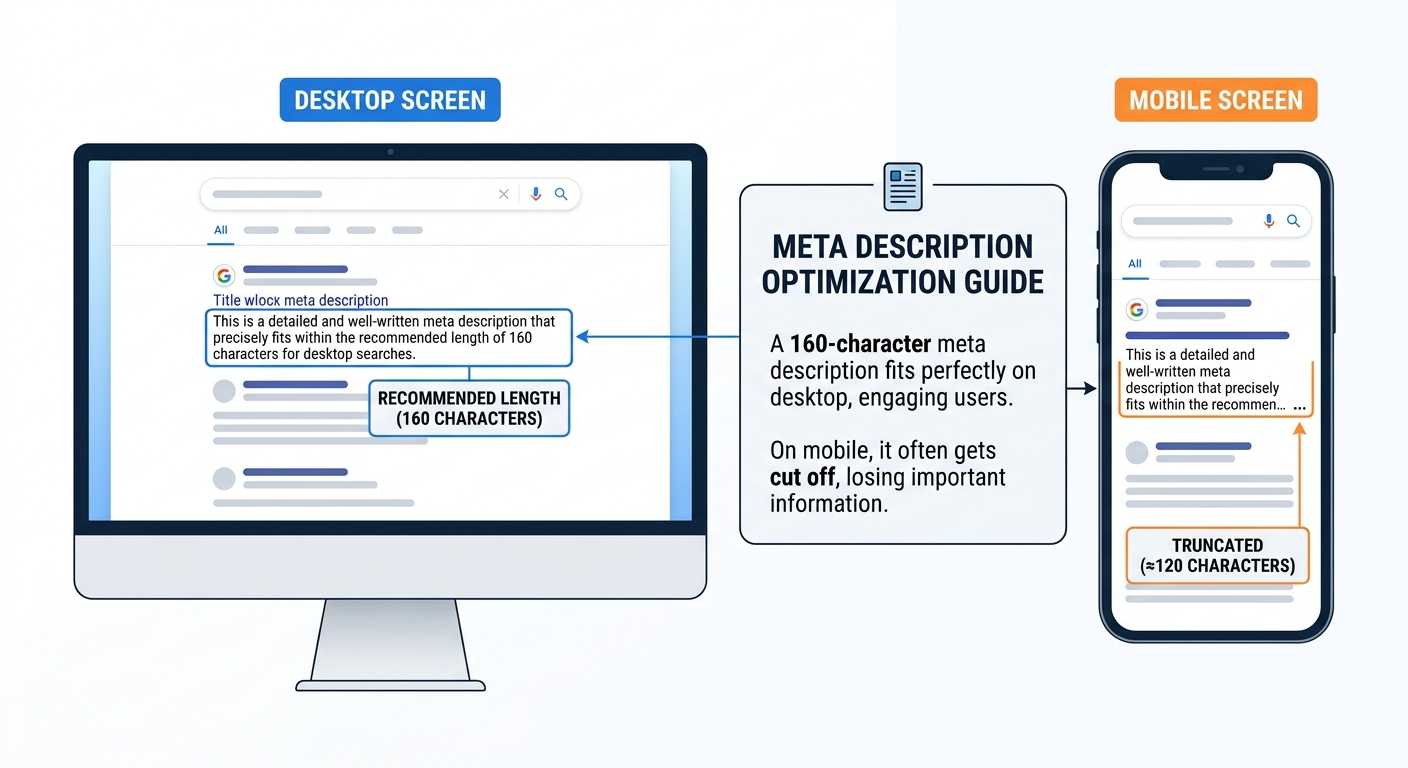
If you write a description that is too long, Google will cut it off with an ellipsis (...). This looks unprofessional and the user might miss the most important part of your message.
Here is the current guideline for meta description length:
| Device | Ideal Character Limit | Pixels |
|---|---|---|
| Desktop | 150 - 160 characters | About 920 pixels |
| Mobile | 110 - 120 characters | About 680 pixels |
My Recommendation: Keep your meta description between 150 and 155 characters. This is the sweet spot. It gives you enough space to write a good summary, but it's short enough to not get cut off on most devices.
How to Write a Perfect Meta Description (Step-by-Step)
Writing a good meta description is an art. But you don't need to be a professional copywriter to do it. Just follow these simple steps:
Step 1: Include Your Main Keyword
Google bolds the keywords in the search results that match the user's query. If you include your main keyword in the meta description, it will be bolded. This draws the user's eye and shows them that your page is relevant to their search.
Step 2: Write a Clear Summary
Explain exactly what the page is about in plain English. Do not use vague words. Be specific. If the page is a list of the best coffee shops in New York, say that.
Step 3: Add a Call to Action (CTA)
Tell the user what to do next. Use action words like "Learn more," "Discover," "Download," "Get started," or "Read the guide." This gives the user a little push to click.
Step 4: Match the Search Intent
Think about what the user is looking for. If they are searching for "how to fix a broken link," they want a step-by-step guide. Your meta description should promise a step-by-step guide. If it says "Buy our tool," the user will not click because it doesn't match their intent.
Step 5: Make it Unique
Never use the same meta description for multiple pages. If you have five pages about different types of coffee, do not use the same description for all of them. Google might see this as duplicate content and ignore your descriptions.
How to Add a Meta Description to Your Website
Adding a meta description is different depending on the platform you use.
1. In WordPress
If you use an SEO plugin like Rank Math or Yoast SEO, you can easily add a meta description in the editor. Just scroll down to the SEO meta box under the post, and you will see a field for the description. It will even show you a preview of how it will look on Google.
2. In Shopify
In Shopify, go to the product or page editor. Scroll down to the "Search engine listing preview" section and click "Edit website SEO." There, you can enter your meta description.
3. In Raw HTML
If you are coding a static website, you must add the meta tag manually inside the <head> section of your HTML document. It looks like this:
<head>
    <title>Your Page Title</title>
    <meta name="description" content="Your perfect description goes here.">
</head>
Common Meta Description Mistakes to Avoid
- Not writing one: If you don't write one, Google will pick random text. It might be a "Read more" link or a cookie policy warning.
- Making it too long: If it's over 160 characters, it will be cut off.
- Keyword stuffing: Do not stuff your keyword 10 times. Write it naturally.
- Using the same description everywhere: Every page needs a unique description.
A Note from the Developer
"When I first started, I ignored meta descriptions. I let Google pick whatever text it wanted. My pages got clicks, but not as many as they could have. Once I started writing custom descriptions with a clear 'Call to Action', my CTR jumped by 25% in one month. It is a small change, but it makes a huge difference." — Habib Ur Rehman
Use Our Free Meta Tag Generator
If you don't want to write the code manually, you can use our free Meta Tag Generator tool. It allows you to fill in your title, description, and other tags, and it will generate the perfect HTML code for you. It also includes Open Graph tags for social media. Try it now!
Frequently Asked Questions
How long should a meta description be?
A meta description should be between 150 and 160 characters. This ensures it does not get cut off on desktop search results. For mobile, it is safer to keep it around 120 characters.
Does a meta description help with SEO rankings?
No, meta descriptions are not a direct ranking factor for Google. However, they directly affect your Click-Through Rate (CTR). A higher CTR can indirectly improve your rankings over time.
What happens if I don't write a meta description?
If you do not write one, Google will automatically pull text from your page to use as the description. This text might not make sense and could lower your click-through rate.
Can I use emojis in my meta description?
Yes, you can use emojis. Sometimes they make your result stand out and get more clicks. But do not overdo it. One emoji is usually enough.
Conclusion
A meta description is a small piece of text, but it is your most important tool for getting clicks from search results. By spending just two minutes writing a unique description for each page, you can significantly increase your website traffic.
Remember the key rules: keep it under 160 characters, include your keyword, and add a call to action. Use our free Meta Tag Generator if you need help. If you want to see how your title and description will look in Google, use our SERP Simulator. Happy optimizing!
Explore More Free SEO Tools
Written and reviewed by: Habib Ur Rehman, Full-Stack Web Developer & SEO Specialist.
Last Updated: November 10, 2026.