How to Build a Topic Cluster & Pillar Page (SEO Guide)
Written by Habib Ur Rehman • Last Updated: November 11, 2026
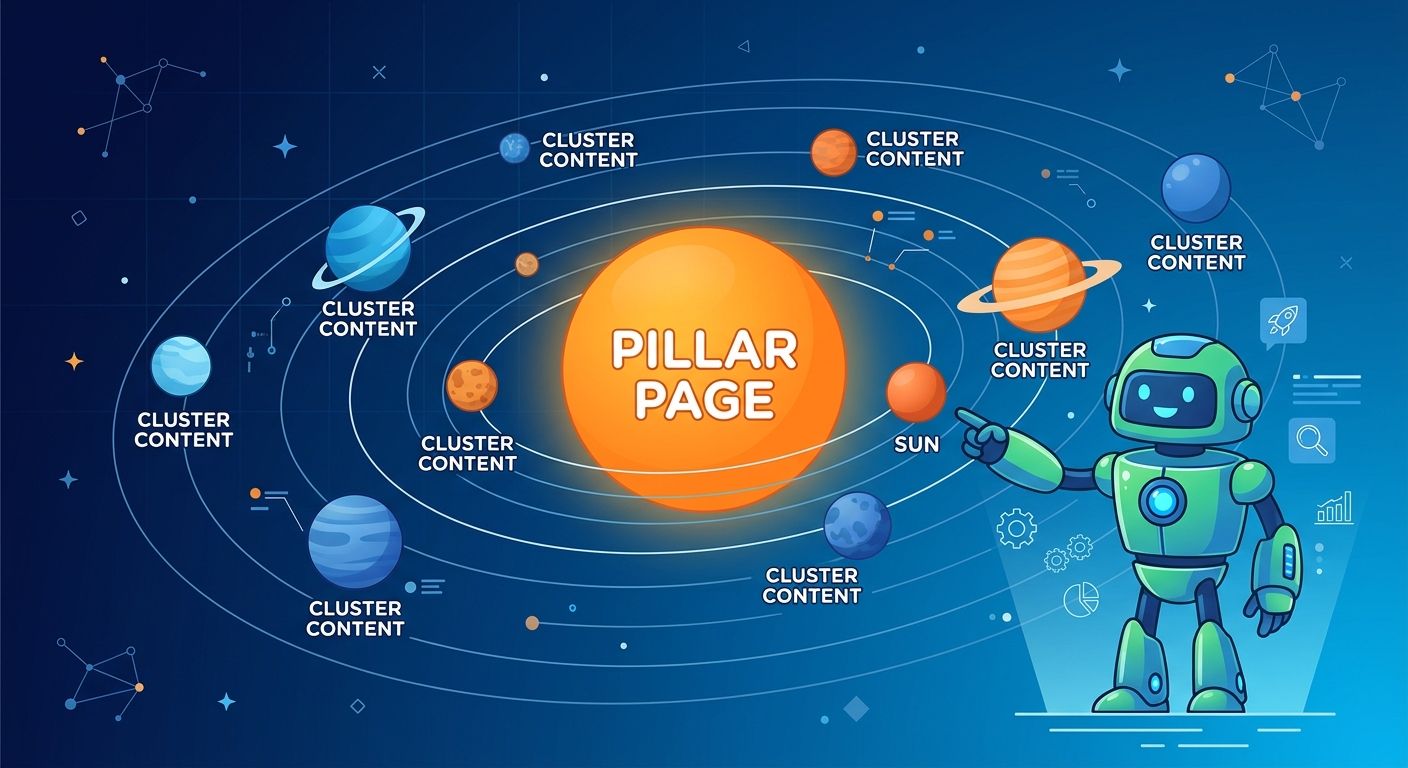
Quick Summary: A Topic Cluster is a group of interlinked web pages that all cover different aspects of the same broad topic. It consists of one main Pillar Page and several smaller Cluster Pages. This structure helps Google understand that your website is an authority on a specific topic. To build one, you need to choose a core topic, create a comprehensive Pillar Page, write 10-20 Cluster Pages, and link them all together using descriptive internal links. This strategy is the fastest way to build Topical Authority and outrank bigger competitors in 2026.
Hello! Have you ever written 50 blog posts and wondered why none of them are ranking? You did all the right things. You did keyword research, you wrote long articles, you added images. But Google is ignoring you.
The problem is not your content. The problem is your structure. Most bloggers write articles as isolated islands. They write one post about SEO, one about email marketing, and one about social media. To Google, this looks like a random collection of information. It does not show expertise.
To win in 2026, you need to organize your content into Topic Clusters. This tells Google, I am not just writing random articles. I am an expert on this entire topic.
In this detailed guide, I will explain exactly what a Topic Cluster is, why it is the most powerful SEO strategy right now, and the exact 4-step framework to build one for your website.
What is a Topic Cluster?
A Topic Cluster is an SEO content structure where you group related articles around a single, broad core topic. Instead of having many unrelated pages, you have one main hub and many connecting spokes.
Think of it like a book. The Pillar Page is the table of contents. The Cluster Pages are the individual chapters. When a user reads the table of contents, they can jump to any chapter. When they finish a chapter, they can go back to the table of contents or read another chapter.
Google loves this structure because it makes crawling and understanding your website much easier. It shows a clear hierarchy and depth of knowledge.
The Two Parts of a Topic Cluster
Every Topic Cluster has two essential parts: the Pillar Page and the Cluster Pages.
1. The Pillar Page (The Hub)
The Pillar Page is a long, comprehensive guide that covers a broad topic. It is usually 3000 to 5000 words long. It gives a high-level overview of the entire topic. It does not go too deep into any one sub-topic. Instead, it links out to the Cluster Pages for more details.
For example, if your website is about digital marketing, your Pillar Page might be titled The Ultimate Guide to Digital Marketing. It would cover SEO, social media, email marketing, and paid ads at a high level.
2. The Cluster Pages (The Spokes)
Cluster Pages are shorter, more focused articles that cover a specific sub-topic in deep detail. They are usually 1500 to 2500 words long. Each cluster page targets a specific long-tail keyword.
Using the digital marketing example, the cluster pages would be:
- How to Do Keyword Research for Beginners
- The Best Social Media Scheduling Tools
- How to Build an Email List from Scratch
- Google Ads vs Facebook Ads: Which is Better?
Each cluster page links back to the Pillar Page. The Pillar Page links to every cluster page. This creates a tight web of internal links that Google can follow.
Why Topic Clusters are the Best SEO Strategy in 2026
Why should you spend the time building a Topic Cluster instead of just writing random blog posts? There are four massive benefits.
1. They Build Topical Authority
Google no longer ranks individual pages based only on keywords. It ranks websites based on their overall knowledge of a topic. When you have a Pillar Page and 15 Cluster Pages, you are proving to Google that you know everything about that topic. This is called Topical Authority. You can read our guide on Topical Authority vs Domain Authority to understand why this beats traditional metrics.
2. They Pass Link Juice Efficiently
When you link from a high-authority page (like a well-performing Pillar Page) to a new Cluster Page, you pass link juice (ranking power) to the new page. This helps the new page rank faster. If your articles are not linked together, they have to build authority on their own, which takes much longer.
3. They Improve User Experience
When a user lands on your Pillar Page, they can easily find more information on any sub-topic by clicking a link. This keeps them on your website longer and increases page views. Google sees this as a positive signal.
4. They Help AI Understand Your Website
AI models like ChatGPT and Gemini are trained to look for connections between concepts. A Topic Cluster is a clear map of connections. If your Pillar Page is about digital marketing and it links to a Cluster Page about email marketing, AI understands that email marketing is part of the broader topic. This increases your chances of being cited in AI Overviews.
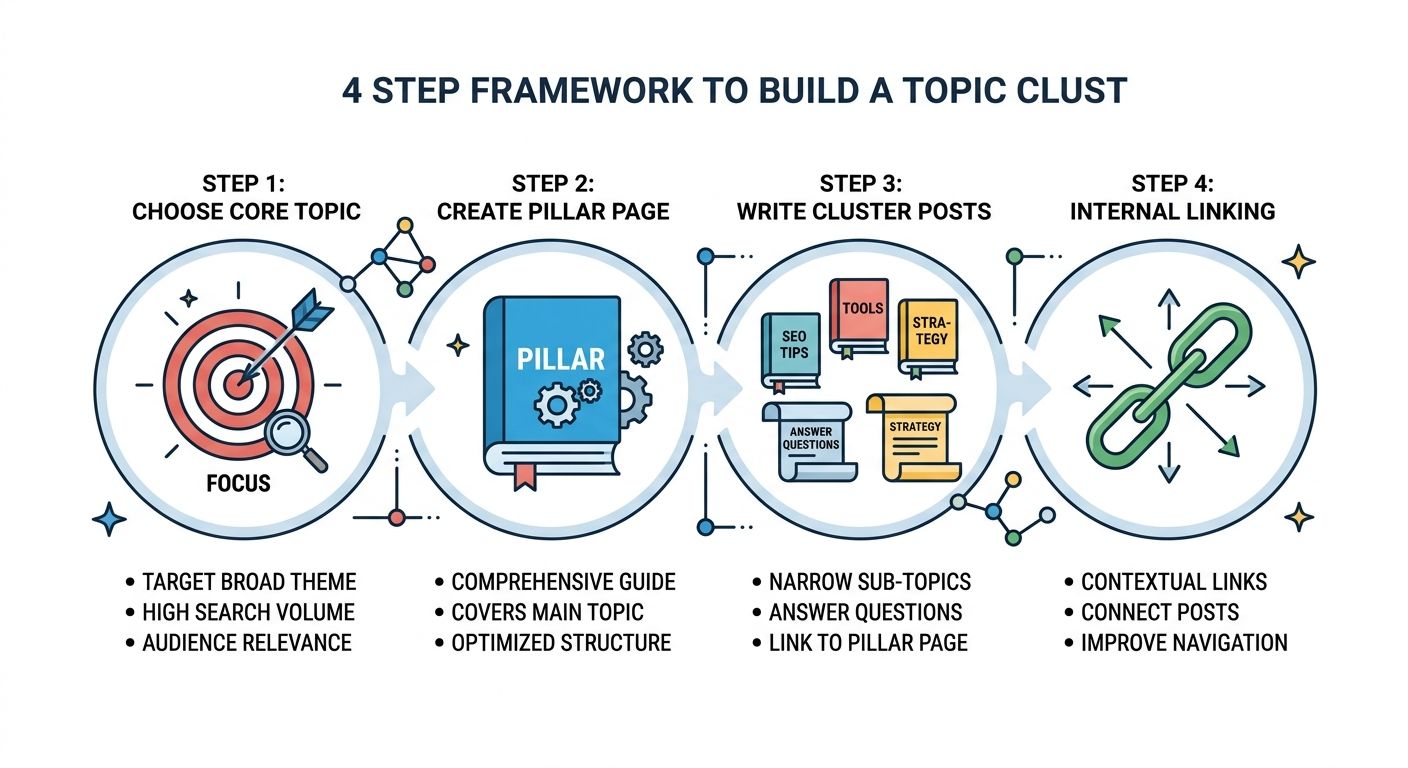
The 4-Step Framework to Build a Topic Cluster
Now that you understand the why, let us look at the how. Here is the exact step-by-step process.
Step 1: Choose Your Core Topic
The first step is to choose one broad topic that your entire website will focus on. This should be related to your business or niche. For example, if you sell coffee beans, your core topic should be coffee, not digital marketing.
Do not try to cover too many unrelated topics. If you write about coffee, cars, and crypto, you will never build Topical Authority in any of them. Choose one topic and go deep. You can use our Keyword Magic Tool to find high-volume sub-topics in your niche.
Step 2: Create Your Pillar Page
Once you have your core topic, create your Pillar Page. This is the most important piece of content on your website. It should be a comprehensive guide of at least 3000 words. It should answer the most common questions about the topic and link to your cluster pages for more detail.
Use a clear structure with H2 and H3 headings for each sub-topic. At the end of each section, add a link to the corresponding cluster page. For example, if you write a section about how to brew coffee, link to your cluster page titled Step-by-Step Guide to Brewing Coffee. You can use our Meta Tag Generator to create perfect meta tags for this page.
Step 3: Write 10-20 Cluster Pages
Now, write the cluster pages. Each page should cover one specific sub-topic in detail. Aim for 1500 to 2500 words per page. Make sure the content is unique, helpful, and answers the user's query.
According to SEO experts, a strong Topic Cluster has at least 10 to 20 cluster pages. This shows Google that you have covered the entire topic in depth. Do not just write 2 or 3 pages. Go deep.
Step 4: Internal Linking (The Secret Sauce)
This is the step that most people get wrong. If your pages are not linked properly, they are not a Topic Cluster. They are just random articles.
Here is the linking structure you must follow:
- Every Cluster Page must link up to the Pillar Page.
- The Pillar Page must link down to every Cluster Page.
- Cluster Pages should link to each other where relevant.
Use descriptive anchor text. Do not use click here or read more. For example, instead of saying click here, say Step-by-Step Guide to Brewing Coffee. This tells Google exactly what the linked page is about. You can use our Broken Link Checker to ensure all your links are working correctly.
Topic Cluster vs Traditional SEO
| Feature | Traditional SEO | Topic Clusters |
|---|---|---|
| Content Structure | Isolated articles on random topics. | Interlinked articles around one core topic. |
| Keyword Focus | One keyword per article. | One broad topic per cluster. |
| Internal Links | Random, often forgotten. | Strategic, every page is connected. |
| Google's View | Generalist website. | Expert website. |
Common Mistakes to Avoid
- Making the Pillar Page too short: A Pillar Page should be the most comprehensive guide on your site. Do not write 1000 words and call it a Pillar Page. Aim for 3000+ words.
- Not linking the Cluster Pages: If you write 20 Cluster Pages and do not link them to the Pillar Page, they are just isolated articles. You will not get the benefits of a Topic Cluster.
- Ignoring Search Intent: If your Pillar Page targets informational keywords, do not fill it with transactional offers. Match the intent.
- Stopping at 5 Cluster Pages: To show true authority, you need at least 10-15 Cluster Pages. Do not give up halfway.
A Note from the Developer
"When I first started building Topic Clusters, I thought it was just about writing more articles. I was wrong. The magic is in the internal linking. I took 15 of my old, isolated blog posts and linked them all to a new 4000-word Pillar Page. I also linked the Pillar Page back to all 15 posts. Within a month, the Pillar Page started ranking for the main keyword, and the traffic to all 15 cluster posts increased by 60%. Google finally understood that I was an expert on that topic. Topic Clusters are the most powerful SEO strategy in 2026." — Habib Ur Rehman
Frequently Asked Questions (FAQ)
What is a Topic Cluster?
A Topic Cluster is a group of interlinked web pages that all cover different aspects of the same broad topic. It consists of one main Pillar Page and several smaller Cluster Pages.
What is a Pillar Page?
A Pillar Page is a long, comprehensive guide (usually 3000+ words) that covers a broad topic in general. It acts as the central hub that links out to all the cluster pages.
Why are Topic Clusters good for SEO?
Topic Clusters help Google understand that your website is an authority on a specific topic. Google rewards websites with strong Topical Authority by ranking them higher in search results.
How many Cluster Pages do I need?
Aim for at least 10 to 15 Cluster Pages per Pillar Page. This shows Google that you have covered the topic in depth.
Conclusion
Topic Clusters are the future of SEO. They are the best way to build Topical Authority, pass link juice, and help AI understand your website. If you are tired of writing random articles that never rank, it is time to change your strategy.
Start by choosing one core topic. Create a Pillar Page. Write cluster pages. Link them all together. Do this consistently, and you will see your traffic grow.
If you want to check your site's technical health, use our free Speed Checker and Broken Link Checker. Happy optimizing!
Sources & References
- HubSpot (2026): Official guide on Topic Clusters and Pillar Pages. Read Guide
- Search Engine Journal: How to structure content for Topical Authority. Read Article
- Google Search Central: Guidance on Internal Linking and Site Structure. Read Guide
Explore More Free SEO Tools
Written and reviewed by: Habib Ur Rehman, Full-Stack Web Developer & SEO Specialist.
Last Updated: November 11, 2026.